| Property | Description |
|---|---|
|
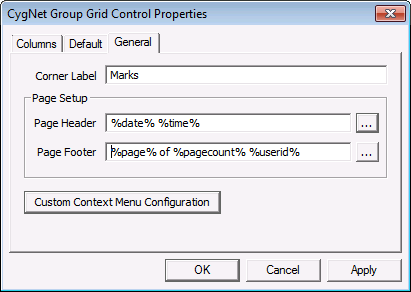
Corner Label |
Specifies the heading for the column in the upper left hand corner of grid. This is a free-form text field and has no character limit. |
| Property | Description |
|---|---|
|
Page Header |
Specifies a page header for printing the grid. Options are: Align Left, Align Right, Align Center, Print Date, Print Time, Page Number, Page Count, and CygNet User. |
|
Page Footer |
Specifies a page footer for printing the grid: Options are: Align Left, Align Right, Align Center, Print Date, Print Time, Page Number, Page Count, and CygNet User. |
To Configure a Print Header or Footer
The text in the Page Header and Page Footer can be dynamic, static, or a combination. Dynamic text is built using tokens.
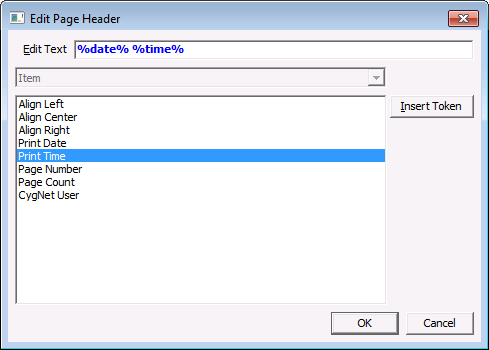
See Using Text Tokens for more general information about building dynamic text using tokens.
| Property | Description |
|---|---|
|
Custom Context Menu Configuration |
Allows a custom context menu options to be added to the right-click context menu of the grid in Run mode. Custom menu options can perform tasks or fire off events through scripting. See Custom Context Menus for more details on how to setup and configure the menu options. |

|
|
|

